Welcome to tzFree blog we believe in Freedom and Sharing

A Blog about Technological Improvements, Sports, Hacking, Security, Games, Movies, Musics, Videos, Books, Softwares Systems and many more.....

Akilimali George I. Bsc ICTM II(Mzumbe University)

A highly astute, responsible, goal oriented, enthusiastic, people-oriented professional, with ability to work independently or within a team, have a highly Computer Information Technology and Management knowledge and creative enough to successfully solve problems and maintain peak efficiency.

tzFree Blog Description

This website is a free website designed and created by Akilimali george I aiming at providing informations and resources free of commercial charges to the majority of Society who are living under a below normal standard income and therefore can not afford to commercially acquire some essential resources through payments.NOTE: This is Non-Commercial website. By:Akilimali George I

tzFree Description By George Akilimali I

A highly astute, responsible, goal oriented, enthusiastic, people-oriented professional, with ability to work independently or within a team, have a highly Computer Information Technology and Management knowledge and creative enough to successfully solve problems and maintain peak efficiency. .

Tuesday, August 6, 2013

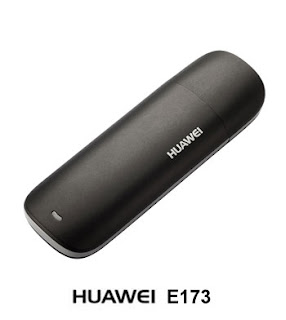
HOW TO UNLOCK HUAWEI MODEM E173

Here are procedures on how to unlock Huawei Modem E173 with 35series of IMEI

First you need to download and install QPST.2.7.378. after finishing to installation, plug in your Huawei E173 with different simcar that can not support on the modem then you will be notified by error that you can not use that simcard then click on exit

1: Now go to Device Manager> port then locate your Modem then note down COM port

2: Now search for the QPST .2.7.378. Start> Program> QPST 

3: Then click on Add new port.. the one you note down 

4: Uncheck "show  serial and USB/QS Diagnostic port only.

5: If you selected the correct port then it will shown like this


6: Then on the Tab click on Start clients then choose software Download 


7: Now the LIFE OF YOUR MODEM DEPENDS ON THIS STAGE your must be very Careful. Click Back up tab then browser then choose location that will save your Backup, then click on start and leave it till it finish to backup your modem. remember that it finished complete and its saved on the location that you selected  (.qcn) then continue with other stages. then quit QPST 


8: Now connect your computer with internet by phone or wireless or other modem that  but not huawei 

Now open Huawei Modem Flasher  then on your left hand side choose Com port of your Modem, Do not Worry you will see different port but its written "3G PC UI  interface"


9: then click Read Modem info Tab. it read your modem info thet it says OK. if its FAIL then there is problem on internet connection.

10: Then look on the tab then click "select Firmware" , Then choose "Extract from EXE"  Then locate Firmware file E1731Update_11.126.15.00.00.B416  and click ok


11: Uncheck 05.bin like this


12: Then On the tab choose "Flash Modem"  then choose "normal mode" then wait till the box promt up and press OK after modem entered on download mode


13: wait while new Firmware installing on your modem 


14: Remember you will get error on 07.bin. don worry, wait for while then it will finish 


15: Now unplug your modem and plugin again you will see that modem won't be able to have network and this becaue it loose its IMEI, So you need to restore your modem. To do that you need to back on first steps on how to open QPST  then.


Configuration then add COM port > software download insted of click back up tab, click on restore tab then click browse then locate the file you created Backup (7 stage) then click start and wait for while and it will finish 


16: after finish quit QPST then unplug your modem and plugin your modem. if you followed the procedures well your modem 100% unlocked permanent and you may use for any simcard, but remember it shows the same IMEI as Before unlock.

If you success don't forgot to leave your comment bellow

How to unlock Huawei E153-u1, E153-u2, and E153-u3


Okay you have this Huawei “redbox” kit from Globe, Sun, or Smart. Well as it is, its understood that it is SIM-locked to the network provider. But how about if you are on a tight budget, and want to unlock the 3G modem instead? With this tutorial, you will be using one dongle for the three 3G internet providers.
The steps are very simple, if you just follow it to the dot. I tested it on my Huawei E153-u2 (SIM-locked to Globe), and it now works very well on any SIM and Mobile Network.
Proceed with caution, and  use the tutorial at your own risk! And again, follow the tutorial as described! If its not described, don’t do it! I already get feedbacks of bricking modem. Mostly its because of not understanding the tutorial. So please read it first before performing it.
Step 1. Backup the device’s data (NVItems). Download the QPST software here. Install this software; you will need it on the succeeding steps.
You will need the backup file in case something went wrong
Step 2. Locate your device’s port. Go to Control Panel, Device Manager. Click “Ports”. You should see something like the one below
On this example, its COM4. It depends on your machine! Check it carefully!

Step 3. Run the QPST software from your Windows programs menu. Click Start, All programs, QPST, Select “QPST Configuration”

Step 4. Add the port located from Step 2, to the running QPST program
Its COM4 on this example. Check your own COM port!

Step 5. Uncheck “Show Serial and USB/QC Diagnostic Port Only” to reveal all COM Ports. Highlight the device’s port.
Its COM4 on this example. Check your own COM port!

If you done it correct, you will see something like
It starts with SURF6246 in Philippines

Step 6. Highlight the COM Port from Step 5, click “Start Clients”, and select “Software Download”

Step 7. Click the “Backup” tab. Before commencing, make sure the Port: portion of the menu is pointing to the correct COM port. On the QCN File:, just click the browse button, and select the directory/folder you want the NVItems data to be saved. Click “Start”
Its COM4 on this example. Check your own COM port!

Step 8. Download Huawei Flasher here, and the Huawei E153 Downgrade firmware here.
Step 9. Start the Huawei Flasher Program. Connect your Huawei E153 dongle, and close the 3G modem dashboard (the modem application to connect to internet) if it’s open. Wait until your modem is detected in the Huawei Flasher program.

Step 10. Click “Select Firmware” and point it to the E153 Downgrade Firmware file from Step 8. You should see “6246_K” on the Model: portion of the menu
Make sure the MODEL box will show 6246_K if its not like that then stop at this point to prevent bricking your modem

Step 11. Uncheck the “06.bin” on the menu. It is needed so that you won’t get error message when downgrading the modem. Click “Flash modem”, and select “Normal mode”. Wait for the pop-up box for 10 seconds before clicking OK. Then leave the software and modem for the downgrading process. At the end of the process, you will get an error (on the 08.bin) but it’s normal. Wait until it is fully finished
Count 10 seconds before clicking OK! Don’t unplug the modem or use any program while doing this operation!

Now, you can use any SIM you like on your unlocked Huawei E153 3G modem!
If you want to restore…
For restore procedure, perform Step 1 up to Step 6, but on Step 7 select the “RESTORE” tab instead

Then you are Done and your modem is unlocked. 
If you have question leave your comment. thanx

Monday, August 5, 2013

IDM Life Time Cracker Free

Download a free Internet download Manager Cracking Tool
  • Its easy To use
  • Effective
  • Life Time
  • Enjoy 
Click Here to Download Now


Internet Download Manager 6.15 Pre Activated Free Download

Powerful and effective, Internet Download Manager includes a huge range of features which will help users to perform files download. It is useful for those who want to get a huge amount of files in a few times.


Key features

Accelerating: as its name points it out, Internet Download Manager is a download management tool. It provides the ability to increase download speed up to 5 times than an ordinary download. Moreover, it includes also many other features which help user to perform this task without hassle such as resume broken processes, comprehensive error recovery, and so on.
  • Compatibilities: Moreover, Internet Download Manager can be run with almost downloading tool. For instance, it supports several web browsers such as Opera, MSN Explorer, AOL, Microsoft Internet Explorer, Mozilla Firefox, Mozilla Firebird and integrates http and ftp protocols, proxy servers and so on.
  • Protection: As for other download management tools, Internet Download Manager also embeds feature which improves protection from harmful contents. Then users are freed from worrying if currently downloading files is a corrupted file or not.


System requirements

  • Operating System: Windows 2000, Windows XP, Windows Vista, Window 7 & Window 8
  • Required space disk: 4 MB
 Free Download From Here

Latest Arnold Schwarzenegger movie Officer Down (2013) 720p BrRip High Quality Free Download

The Last Stand is a 2013 action film starring Arnold Schwarzenegger, written by Andrew Knauer and directed by Kim Ji-woon. 
Initial release: January 12, 2013
Director: Kim Ji-woon
Initial DVD release: May 21, 2013 (USA)
Screenplay: Jeffrey Nachmanoff, Andrew Knauer, George Nolfi
Size: 797 MB 

Language: English
Free Download Using Torrent From Here
 

GI Joe Retaliation New TSRip Pimp4003 (PimpRG)

G.I. Joe: Retaliation is a 2013 American science fiction action film directed by Jon M. Chu, based on Hasbro's G.I. Joe toy, comic and media franchises. It is a sequel to 2009's G.I. Joe: The Rise of Cobra.
Initial release: March 27, 2013 (Belgrade, Taiwan, Sweden, ...)
 
Director: Jon M. Chu
 
Running time: 110 minutes
 
Initial DVD release: July 30, 2013 (USA)
 
Screenplay: Paul Wernick, Rhett Reese
 
Size: 460 MB 

Language: English
Click Here To download Free Now Using Torrent 

Download Olympus Has Fallen 2013 BRRip High Quality Movie Free.

    Olympus Has Fallen is a 2013 American action-thriller film. Directed by Antoine Fuqua, it stars Gerard Butler, Aaron Eckhart, and Morgan Freeman.
      
    Initial release: March 20, 2013 (France)
    Director: Antoine Fuqua
    Producer: Gerard Butler
    Cinematography: Conrad W. Hall
    Genres: Thriller, Action film
    Size: 697 MB 
    Language: English

    Free Download Using Torrent From Here

Related Posts Plugin for WordPress, Blogger...

Reliable & Affordable Hosting+Web Services